
Unofficial guide (비공식 안내)
Socinet and kiiptest.org guide (사회통합정보망·kiiptest.org 이용 안내)
LearnKIIP is an unofficial study site, not the Ministry of Justice or the Korea Immigration Services Foundation. You sign up, register, pay and see your results only on the official sites below.
LearnKIIP는 비공식 학습 사이트예요. 법무부나 한국이민재단이 아니에요. 가입, 접수, 결제, 결과 확인은 아래 공식 사이트에서만 해요.
- Official (공식)Socinet (사회통합정보망)socinet.go.krKIIP account, starting level, class application, class fee, resultsKIIP 계정, 시작 단계, 과정신청, 교육수수료, 결과
- Official (공식)KIIP test site (평가 홈페이지)kiiptest.orgTest registration and payment, admission ticket, CBT booking, results평가 접수·결제, 접수증, CBT 예약, 결과
- Official (공식)HiKorea (하이코리아)hikorea.go.krVisa and stay applications, office visit booking, naturalization information체류 민원 신청, 방문예약, 귀화 안내
Can't log in? Login and password fixes (로그인·비밀번호 문제 해결)
Taking the placement test (사전평가)? Practise free first: 50 questions, 60 minutes, then your estimated level with explanations.
사전평가를 볼 예정이라면 먼저 무료로 연습해 보세요. 50문항·60분, 예상 단계와 해설을 볼 수 있어요.Which official KIIP site does what, the steps in order, fees, and fixes for login, registration and payment problems.
어느 공식 사이트에서 무엇을 하는지, KIIP 순서, 수수료, 로그인·접수·결제 문제 해결 방법을 정리했어요.
What you do where (어디서 무엇을 하나요)
Menu names are in Korean, as they appear on the sites. They can change when a site is redesigned.메뉴 이름은 사이트에 보이는 그대로 한국어로 적었어요. 사이트가 바뀌면 달라질 수 있어요.
Socinet (사회통합정보망)socinet.go.kr
| Menu (메뉴) | What you do (하는 일) |
|---|---|
| 회원가입 | Create your KIIP account. Do this first: kiiptest.org uses the same ID.KIIP 계정을 만들어요. 가장 먼저 해요: kiiptest.org도 같은 아이디를 써요. |
| 사회통합프로그램 → 단계배정 | Choose how you start: level 0, the placement test (사전평가) or a TOPIK link (연계).시작 방법을 골라요: 0단계, 사전평가, TOPIK 연계. |
| 사회통합프로그램 → 과정신청 | Apply for classes at a training centre for a term.학기마다 운영기관의 수업을 신청해요. |
| 마이페이지 → 상태 → 결제 | Pay the class fee by card or bank transfer, after the level ends and before you apply for the test.교육수수료를 카드나 계좌이체로 내요. 단계가 끝난 뒤, 평가 신청 전에 내요. |
| 사회통합프로그램 → 평가신청 | Start a test application. It takes you to kiiptest.org, where you register and pay.평가 신청을 시작해요. kiiptest.org로 연결되고, 접수와 결제는 거기서 해요. |
| 마이페이지 → 회원상세정보확인 | Bring your address (체류지) and visa status (체류자격) up to date. Old details block test registration.체류지와 체류자격을 최신으로 고쳐요. 예전 정보면 평가 접수가 막혀요. |
| 알림마당 → 공지사항 · 관련규정 · 민원서식 · 증명서 확인 | Notices, rules (such as the KIIP operating guidelines), forms such as the TOPIK link form, and certificate checks.공지, 운영지침 같은 규정, 연계 신청서 같은 서식, 증명서 확인. |
| 회원로그인 → 아이디/비밀번호 찾기 | Find your ID or reset your password.아이디를 찾거나 비밀번호를 다시 정해요. |
KIIP test site (평가 홈페이지)kiiptest.org
| Menu (메뉴) | What you do (하는 일) |
|---|---|
| 회원가입 (소시넷에서 회원가입) | Sign up with your Socinet ID (button 소시넷에서 회원가입).사회통합정보망 아이디로 가입해요. |
| 평가 접수 | Register for a test, on paper (PBT) or on a computer (CBT), and pay ₩38,000.종이 시험(PBT)이나 컴퓨터 시험(CBT)을 접수하고 38,000원을 내요. |
| 마이페이지 → 접수 확인 | Registration status, admission ticket (접수증) and cancellation.접수 상태, 접수증, 접수 취소. |
| 마이페이지 → 성적 확인 | Your results, from 16:00 Korea time on results day.결과 확인 (결과 발표일 16:00부터). |
| 공지사항 | The notice for each round: dates, rules and refunds.회차별 접수 안내: 날짜, 규정, 환불. |
HiKorea (하이코리아)hikorea.go.kr
| Menu (메뉴) | What you do (하는 일) |
|---|---|
| 민원신청 → 전자민원 · 방문예약 | Apply online for stay permits (for example a change of status to F-5), or book a visit to an immigration office.체류 허가(예: F-5로 변경)를 온라인으로 신청하거나 출입국·외국인관서 방문을 예약해요. |
| 정보광장 → 체류자격별 안내매뉴얼 · 국적/귀화안내 | Rules for each visa type, and naturalization information. Naturalization is a separate nationality application, not a visa.체류자격별 규정과 귀화 안내. 귀화는 비자가 아니라 따로 하는 국적 신청이에요. |
| 정보조회 → 국적심사 진행상황 조회 | Check how your naturalization review is going.귀화 심사가 어디까지 왔는지 확인해요. |
Your path, step by step (KIIP 순서)
The usual order for a new learner. Each step links to the official site or to our free practice page for it.처음 시작하는 사람의 보통 순서예요. 단계마다 공식 사이트나 LearnKIIP 무료 연습 페이지로 연결돼요.
Sign up on Socinet (사회통합정보망 회원가입)
Create your account on socinet.go.kr (회원가입). Everything else in KIIP starts from it.socinet.go.kr에서 계정을 만들어요(회원가입). KIIP의 모든 절차가 여기서 시작돼요.C-3-8 visa holders (short-term visit for overseas Koreans) can take the placement test, but can join classes only after alien registration.동포방문(C-3-8) 비자로 온 사람은 사전평가는 볼 수 있지만, 수업은 외국인등록을 한 뒤에 들을 수 있어요.Choose your starting level (시작 단계 정하기: 단계배정)
- Level 0 (0단계): start without a test. 15 hours, free.0단계: 시험 없이 시작해요. 15시간, 무료.
- Placement test (사전평가): your score sets your level (0–5). Choosing it under 단계배정 takes you to kiiptest.org to register and pay. The result is valid for 2 years.사전평가: 점수로 단계(0~5)가 정해져요. 단계배정에서 사전평가를 고르면 kiiptest.org로 연결되고, 접수와 결제는 거기서 해요. 결과는 2년 동안 유효해요.
- TOPIK link (연계): TOPIK 1 → level 2, TOPIK 2 → level 3, TOPIK 3 → level 4, TOPIK 4–6 → level 5. TOPIK IBT counts too.TOPIK 연계: TOPIK 1급 → 2단계, 2급 → 3단계, 3급 → 4단계, 4~6급 → 5단계. TOPIK IBT도 같아요.
- How: sign up on Socinet, then send the TOPIK link form [서식1] and a TOPIK score report that is still valid and shows a document number (문서확인번호) to your immigration office's integration centre (이민통합지원센터) or a KIIP training centre, in person or by email. There is no Socinet menu to do it yourself. The level appears on Socinet within 7 days; start classes within 2 years.연계 신청: 사회통합정보망에 가입한 뒤, 연계 신청서[서식1]와 유효한 TOPIK 성적증명서(문서확인번호 있는 것)를 관할 출입국·외국인관서 이민통합지원센터나 운영기관에 방문 또는 이메일로 내요. 사회통합정보망에서 직접 하는 메뉴는 없어요. 7일 안에 단계가 배정되고, 2년 안에 수업을 시작해야 해요.
- Marriage migrants who proved basic Korean when they got the F-6 visa (TOPIK 1, or a certificate from a Ministry-designated school abroad such as 세종학당) can start at level 2 without the placement test. They apply the same way.결혼이민자: F-6 비자를 받을 때 기초 한국어를 증명한 사람(TOPIK 1급, 세종학당 등 법무부 지정 해외 교육기관 이수증)은 사전평가 없이 2단계부터 시작할 수 있어요. 신청 방법은 같아요.
Sign up on kiiptest.org (kiiptest.org 회원가입)
kiiptest.org is a separate site with its own account. Sign up there with your Socinet ID (소시넷에서 회원가입). Being logged in to Socinet doesn't log you in to kiiptest.org.kiiptest.org는 계정이 따로 있는 다른 사이트예요. 사회통합정보망 아이디로 가입해요(소시넷에서 회원가입). 사회통합정보망에 로그인해도 kiiptest.org에는 로그인되지 않아요.Register in the registration window (접수 기간에 평가 접수)
Paper tests (PBT) open on set dates at 09:00 Korea time, first come, first served in each region. CBT booking opens every other Thursday at 09:00.종이 시험(PBT)은 정해진 날 오전 9시(한국 시간)부터 지역별 선착순이에요. CBT 접수는 격주 목요일 오전 9시에 열려요.Apply for classes and attend them (과정신청과 수업)
Apply under 과정신청. Hours: level 0 has 15, levels 1–4 have 100 each, level 5 has 70 (basic, for permanent residence) + 30 (advanced, for naturalization).과정신청에서 신청해요. 시간: 0단계 15시간, 1~4단계 각 100시간, 5단계 70시간(기본과정, 영주용) + 30시간(심화과정, 귀화용).Class fees (since 1 January 2025) (교육수수료 (2025년 1월 1일부터))
Level (단계) Hours (시간) Fee (수수료) 0단계 15 Free (무료) 1단계 100 100,000원 2단계 100 100,000원 3단계 100 100,000원 4단계 100 100,000원 5단계 기본과정 (영주용) 70 70,000원 5단계 심화과정 (귀화용) 30 30,000원 - Half price if you attended 100% of the level or your teacher recommends you for good participation.감경: 해당 단계를 100% 출석했거나 강사가 추천한 성실 참여자는 50%만 내요.
- No fee for basic livelihood recipients and their families, national and independence merit holders and their families, people with severe disabilities, F-1-52 and F-2-2 holders, and some G-1 holders.면제: 기초생활수급자와 그 가족, 국가·독립유공자와 그 가족, 중증장애인, F-1-52, F-2-2, 일부 G-1은 내지 않아요.
Pay the class fee before the test (평가 전에 교육수수료 내기)
When the level ends, pay on Socinet: 마이페이지 → 상태 → 결제 (credit card or bank transfer). If the fee is still unpaid when test registration closes, you can't take the test.단계가 끝나면 사회통합정보망 마이페이지 → 상태 → 결제에서 내요(신용카드·계좌이체). 평가 신청이 끝날 때까지 안 내면 평가를 볼 수 없어요.Take the tests (평가 보기)
- Levels 1–3: a level test (단계평가) at your training centre at the end of each level. No test fee.1~3단계: 각 단계가 끝날 때 운영기관에서 단계평가를 봐요. 응시료 없음.
- After level 4: the mid-term test (중간평가), to move on to level 5. Paper (PBT) or computer (CBT; CBT only at the end of each term).4단계 뒤: 중간평가. 5단계로 올라가려면 필요해요. PBT 또는 CBT(CBT는 학기 말에만).
- After level 5: the final test (종합평가). For permanent residence (영주용): paper only. For naturalization (귀화용): paper or computer.5단계 뒤: 종합평가. 영주용은 종이 시험(PBT)만, 귀화용은 PBT·CBT.
- Test fee: ₩38,000 per test (placement, mid-term or final test; PBT and CBT; VAT included).응시료: 1회 38,000원 (사전·중간·종합평가, PBT·CBT, 부가세 포함).
See your results (결과 확인)
Results appear from 16:00 Korea time on socinet.go.kr and kiiptest.org (마이페이지 → 성적 확인). You don't get a message. CBT: 2 working days after the test. PBT placement and mid-term tests: 13 days after. PBT final tests: 6 days after. Holidays can move the date.결과는 오후 4시(16:00, 한국 시간)부터 socinet.go.kr과 kiiptest.org(마이페이지 → 성적 확인)에서 봐요. 따로 연락이 오지 않아요. CBT: 시험 뒤 평일 2일. PBT 사전·중간평가: 13일 뒤. PBT 종합평가: 6일 뒤. 공휴일에 따라 바뀔 수 있어요.Finished, completed, passed: not the same (수료·이수·합격은 달라요)
- 수료: you finished the classes of a level.수료: 단계 수업을 마쳤어요.
- 이수: KIIP recognises that you completed a level or the programme. What counts differs by visa: some need a completed level, others also accept a placement test score, a passed test or current KIIP study.이수: 단계나 과정을 마친 것으로 인정받았어요. 비자마다 인정하는 것이 달라요. 단계 이수가 필요한 비자도 있고, 사전평가 점수, 평가 합격이나 KIIP 수강 중인 것을 인정하는 비자도 있어요.
- 합격: you passed a test, for example 60 points or more in the final test.합격: 평가에 붙었어요. 예: 종합평가 60점 이상.
- With 85 points or more in the placement test, you may take the permanent-residence final test within 2 years without level 5 classes. A pass meets the basic-knowledge requirement for F-5, but it doesn't count as KIIP completion (이수).사전평가 85점 이상이면 2년 안에 5단계 수업 없이 영주용 종합평가를 볼 수 있어요. 합격하면 영주(F-5)의 기본소양 요건을 채우지만, KIIP 이수로 인정되지는 않아요.
What KIIP counts for (KIIP가 쓰이는 곳)
- F-5 permanent residence: completing level 5 basic (영주용) or scoring 60 or more on a final test (영주용 and 귀화용 both count) meets the basic-knowledge requirement. It is one of several requirements. Some F-5 types, such as investors and PhD holders, are exempt or follow their own rules.영주(F-5): 5단계 기본과정(영주용) 이수 또는 종합평가 60점 이상(영주용·귀화용 모두 인정)으로 기본소양 요건을 채워요. 여러 요건 중 하나예요. 투자자·박사 등 일부 F-5 종류는 이 요건이 면제되거나 따로 정한 기준을 따라요.
- Naturalization: passing the naturalization final test (60 points or more) replaces the naturalization written test (since 1 March 2018). If you completed KIIP, or scored 60 or more on a final test in the 3 years before applying, you can be exempt from the test. Otherwise you take it within 1 year of your application; if you fail, you can retake it within that year with no fixed limit (at most once a day). Being excused from the interview needs both all of level 5 (basic 70 hours + advanced 30 hours) and 60 points or more on the final test.귀화: 귀화용 종합평가 합격(60점 이상)이 귀화 필기시험을 대신해요(2018년 3월 1일부터). KIIP를 이수했거나 신청일 전 3년 안에 종합평가 60점 이상을 받았으면 평가를 면제받을 수 있어요. 그 밖에는 신청일부터 1년 안에 보고, 떨어지면 그 안에서 횟수 제한 없이 다시 볼 수 있어요(하루 1번까지). 면접 면제에는 5단계 전체(기본 70시간 + 심화 30시간) 이수와 종합평가 60점 이상이 모두 필요해요.
- F-2-7 points: completed KIIP level 5 = 20 points, level 4 = 15, level 3 = 10, level 2 = 5, level 1 = 3, plus 10 bonus points for completing level 5 basic or higher (30 in total). Minimum: 80 of 170 points, and other conditions are checked too.F-2-7 점수: KIIP 5단계 이수 20점, 4단계 15점, 3단계 10점, 2단계 5점, 1단계 3점. 5단계 기본과정 이상 이수 시 10점 가점(총 30점). 170점 중 80점 이상이 최소 기준이고, 다른 요건도 함께 봐요.
- Visa rules change. Confirm with HiKorea or 1345 before you apply.비자 규정은 바뀌어요. 신청 전에 하이코리아나 1345에 확인하세요.
Registering on kiiptest.org, with screenshots (kiiptest.org 접수 따라하기)
The screenshots show sample data (names, dates, places, amounts), not a real booking. Red boxes mark what to press. Tap a picture to see it full size.화면 속 이름, 날짜, 장소, 금액은 예시예요. 빨간 상자가 누를 곳이에요. 그림을 누르면 크게 볼 수 있어요.
- On kiiptest.org, press 평가 접수 (register for a test).kiiptest.org에서 평가 접수를 눌러요.
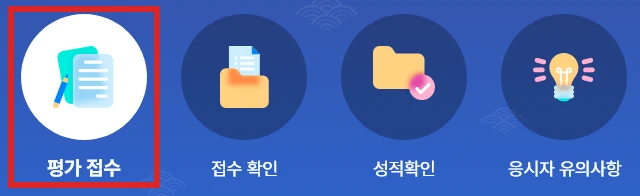
kiiptest.org screen (captured 2025-12, sample data). The screen may have changed.kiiptest.org 화면 (kiiptest.org 첫 화면의 평가 접수 버튼, 2025-12 캡처, 예시 데이터) · 화면이 바뀌었을 수 있어요 - Log in with your kiiptest.org ID, password and the code in the picture. No account? Press 소시넷에서 회원가입 (sign up via Socinet). Forgot the password? Press 비밀번호를 잊으셨나요?.kiiptest.org 아이디, 비밀번호, 그림 속 숫자를 넣고 로그인해요. 계정이 없으면 소시넷에서 회원가입, 비밀번호를 잊었으면 비밀번호를 잊으셨나요?를 눌러요.
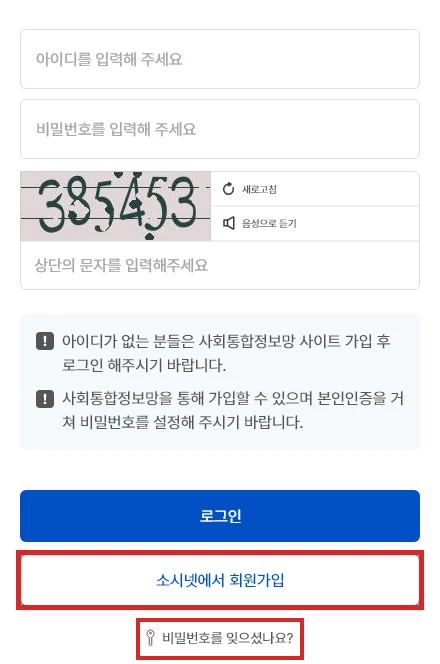
kiiptest.org screen (captured 2025-12, sample data). The screen may have changed.kiiptest.org 화면 (kiiptest.org 로그인 화면의 소시넷에서 회원가입 버튼, 2025-12 캡처, 예시 데이터) · 화면이 바뀌었을 수 있어요 - Under 평가 구분, choose the test (for example 종합평가 영주용 or 귀화용, CBT 사전평가). Under 특별 배려대상여부, say whether you need special accommodation. Then press 다음 단계.평가 구분에서 시험을 고르고(예: 종합평가 영주용·귀화용, CBT 사전평가), 특별 배려대상여부를 고른 뒤 다음 단계를 눌러요.
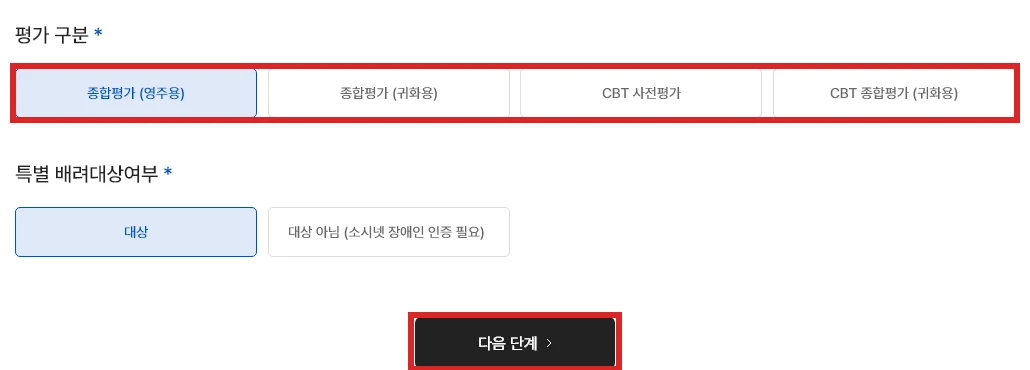
kiiptest.org screen (captured 2025-12, sample data). The screen may have changed.kiiptest.org 화면 (평가 구분 선택과 다음 단계 버튼, 2025-12 캡처, 예시 데이터) · 화면이 바뀌었을 수 있어요 - Choose 1. 평가 장소 (place), 2. 평가일 (date) and 3. 회차 및 시간 (session and time), then press 다음 단계. Seats go first come, first served.1. 평가 장소, 2. 평가일, 3. 회차 및 시간을 고르고 다음 단계를 눌러요. 자리는 선착순이에요.
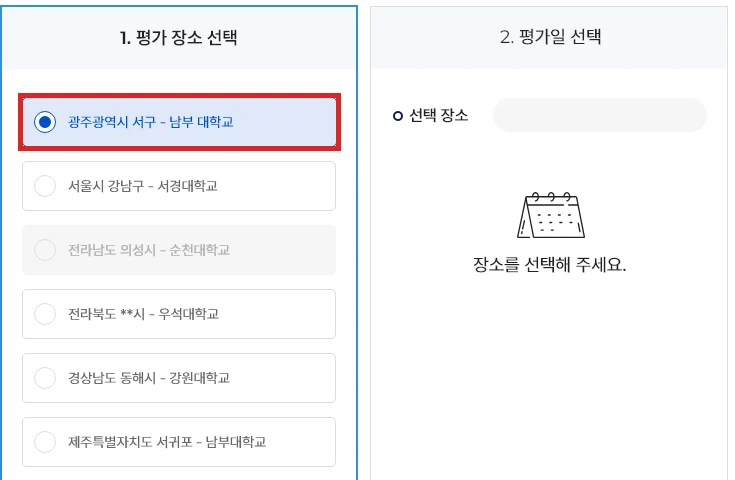
kiiptest.org screen (captured 2025-12, sample data). The screen may have changed.kiiptest.org 화면 (평가 장소 선택 화면, 2025-12 캡처, 예시 데이터) · 화면이 바뀌었을 수 있어요 - Choose how to pay (가상계좌 virtual account, 실시간 계좌이체 bank transfer or 신용카드 card), tick that you read the notes and refund rules, and press 결제하기. With a virtual account, pay by 23:59 the next day or the booking is cancelled.결제 수단(가상계좌, 실시간 계좌이체, 신용카드)을 고르고, 주의사항과 환불 안내를 확인했다고 체크한 뒤 결제하기를 눌러요. 가상계좌는 다음 날 23:59까지 입금하지 않으면 접수가 취소돼요.
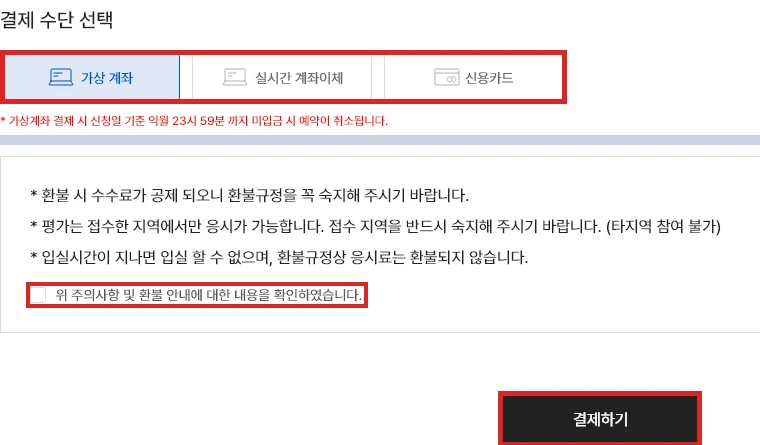
kiiptest.org screen (captured 2025-12, sample data). The screen may have changed.kiiptest.org 화면 (결제 수단 선택과 결제하기 버튼, 2025-12 캡처, 예시 데이터) · 화면이 바뀌었을 수 있어요 - 접수가 정상적으로 완료되었습니다 means you are registered. You can check it under 마이페이지."접수가 정상적으로 완료되었습니다"가 나오면 접수 끝이에요. 마이페이지에서 확인할 수 있어요.
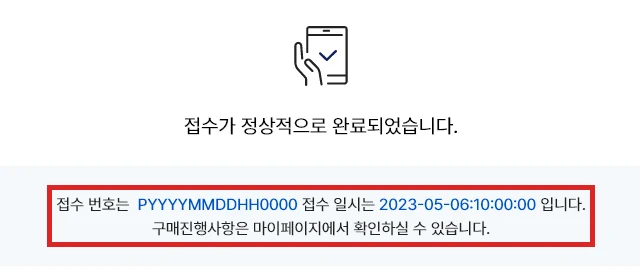
kiiptest.org screen (captured 2025-12, sample data). The screen may have changed.kiiptest.org 화면 (접수 완료 안내, 2025-12 캡처, 예시 데이터) · 화면이 바뀌었을 수 있어요 - 마이페이지 → 접수 확인 lists your registrations: 입금 대기 (waiting for payment), 접수 완료 (registered) or 접수 취소 (cancelled), and the 접수증 (admission ticket) button.마이페이지 → 접수 확인에서 접수 상태(입금 대기, 접수 완료, 접수 취소)와 접수증 버튼을 볼 수 있어요.
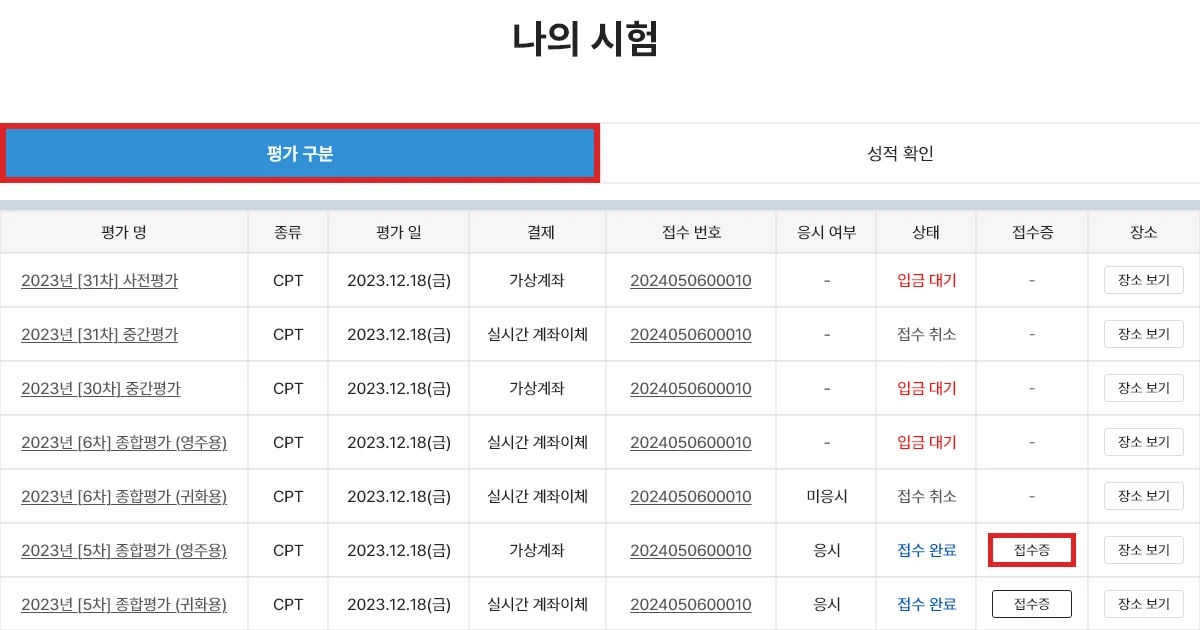
kiiptest.org screen (captured 2025-12, sample data). The screen may have changed.kiiptest.org 화면 (접수 확인 목록의 접수증 버튼, 2025-12 캡처, 예시 데이터) · 화면이 바뀌었을 수 있어요
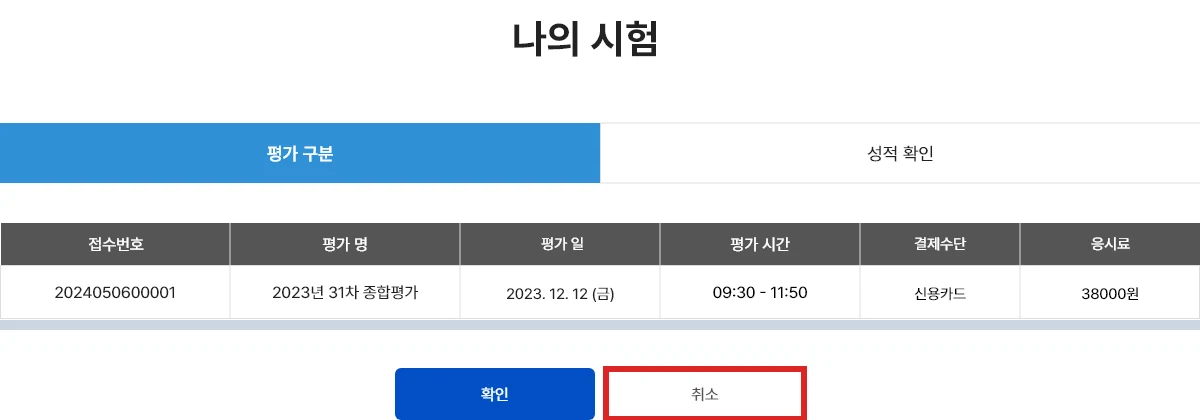
Cancel a registration (접수 취소)
Problems and fixes (문제 해결)
Times are Korea time (KST). Each fix names the notice it comes from; rules can change from round to round.시간은 모두 한국 시간(KST)이에요. 해결 방법마다 출처 공지를 적었어요. 규정은 회차마다 바뀔 수 있어요.
I forgot my ID or password아이디·비밀번호를 잊었어요
Your kiiptest.org ID is your Socinet ID. Socinet: on the login page, press 아이디/비밀번호 찾기. kiiptest.org password: login page → 비밀번호를 잊으셨나요? → enter your ID and alien registration number (C-3-8 holders: passport number).kiiptest.org 아이디는 사회통합정보망 아이디와 같아요. 사회통합정보망: 로그인 화면에서 아이디/비밀번호 찾기. kiiptest.org 비밀번호: 로그인 화면 → 비밀번호를 잊으셨나요? → 아이디와 외국인등록번호(C-3-8은 여권번호).Source (출처): kiiptest.org 비밀번호 찾기 · kiiptest.org 비밀번호 찾기, socinet 로그인 화면
kiiptest.org sign-up doesn't workkiiptest.org 회원가입이 안 돼요
Sign up on Socinet first. Then on kiiptest.org press 소시넷에서 회원가입 and confirm your identity to set a kiiptest.org password.사회통합정보망에 먼저 가입하세요. 그다음 kiiptest.org에서 소시넷에서 회원가입을 누르고 본인인증을 거쳐 비밀번호를 정해요.Source (출처): 법무부 「2025년도 사회통합프로그램 운영지침」 · 운영지침 2025, kiiptest.org 로그인 화면
The 다음단계 (next step) button doesn't work"다음단계"가 안 눌려요
Your address or visa status on Socinet is out of date. Log in to Socinet → 마이페이지 → 회원상세정보확인, update your 체류지 (address) and 체류자격 (visa status), then try again.사회통합정보망의 체류지나 체류자격 정보가 예전 것이에요. 사회통합정보망 → 마이페이지 → 회원상세정보확인에서 체류지와 체류자격을 고친 뒤 다시 해 보세요.Source (출처): kiiptest.org 공지 「2차 사전평가 접수안내」 · PBT 사전평가, 공지 2026-02-20
"체류정보 조회 불가" (stay information not found)"체류정보 조회 불가"가 떠요
Log in to Socinet and press 단계배정 first (for the placement test, choose 사전평가 there). Then register on kiiptest.org again.사회통합정보망에 로그인해서 먼저 단계배정을 누르세요(사전평가라면 거기서 사전평가 선택). 그다음 kiiptest.org에서 다시 접수해요.Source (출처): kiiptest.org 공지 「2차 사전평가 접수안내」 · PBT 사전평가, 공지 2026-02-20
Payment fails결제가 안 돼요
Try another browser, or clear cookies and cache and try again. A virtual account (가상계좌) must be paid by 23:59 the next day.다른 브라우저를 쓰거나 쿠키와 캐시를 지우고 다시 해 보세요. 가상계좌는 다음 날 23:59까지 입금해야 해요.Source (출처): kiiptest.org 공지 「2차 사전평가 접수안내」 · PBT 사전평가, 공지 2026-02-20
I can't take the test because of the class fee교육수수료 때문에 평가를 못 봐요
The class fee for your level must be paid on Socinet (마이페이지 → 상태 → 결제) before test registration closes. If it is unpaid, you can't take the test. Level 0 and exempt groups pay nothing.해당 단계 교육수수료는 평가 신청이 끝나기 전에 사회통합정보망(마이페이지 → 상태 → 결제)에서 내야 해요. 안 내면 평가를 볼 수 없어요. 0단계와 면제 대상은 내지 않아요.Source (출처): 사회통합프로그램 참여자 교육수수료 알림 (법무부 고시 제2024-434호, 2025-01-01 시행) · 교육수수료 공지 2026-08-13
C-3-8 visa: logging in with a passport numberC-3-8 비자: 여권번호로 로그인
Without an alien registration number, use your passport number: kiiptest.org's password reset asks for your ID and passport number. C-3-8 holders can take the placement test, but can join classes only after alien registration.외국인등록번호가 없으면 여권번호를 써요. kiiptest.org 비밀번호 찾기에서 아이디와 여권번호를 넣어요. C-3-8은 사전평가는 볼 수 있지만 수업은 외국인등록 뒤에 들을 수 있어요.Source (출처): kiiptest.org 비밀번호 찾기 · kiiptest.org 비밀번호 찾기, 사전평가 안내
I was logged out로그아웃됐어요
kiiptest.org logs you out 10 minutes after you log in. Decide your test, place and payment method before you start, and log in again if needed.kiiptest.org는 로그인 10분 뒤에 자동으로 로그아웃돼요. 시험, 장소, 결제 수단을 미리 정하고 시작하세요. 필요하면 다시 로그인해요.Source (출처): kiiptest.org 공지 「2차 사전평가 접수안내」 · PBT 사전평가 공지 2026-02-20, CBT 23기 공지 2026-10-19
Registration opens at 09:00 and seats run out오전 9시에 접수가 열리고 자리가 금방 없어져요
PBT seats are first come, first served in each region from 09:00 KST on the first day: kiiptest.org → 바로가기 → 접수대기 (queue) → 로그인 → 접수. Wait in the queue. CBT booking opens every other Thursday at 09:00.PBT는 첫날 오전 9시(한국 시간)부터 지역별 선착순이에요: kiiptest.org → 바로가기 → 접수대기 → 로그인 → 접수. 대기 순서를 기다리세요. CBT 접수는 격주 목요일 오전 9시에 열려요.Source (출처): kiiptest.org 공지 「2차 사전평가 접수안내」 · PBT 사전평가 공지 2026-02-20 (CBT: 격주 목요일 09:00)
Where is my admission ticket?접수증은 어디서 받나요?
For PBT you can print the admission ticket (접수증) from 3 days before the test, after the text message with your test site: kiiptest.org → 마이페이지 → 접수 확인 → 접수증. Bring an original ID: alien registration card, passport, Korean driving licence or a residence certificate with a photo. Copies, photos and mobile IDs are not accepted.PBT 접수증은 시험 3일 전부터, 시험장 안내 문자를 받은 뒤 kiiptest.org → 마이페이지 → 접수 확인 → 접수증에서 출력해요. 원본 신분증(외국인등록증, 여권, 국내 운전면허증, 사진 있는 체류허가확인서)을 가져가세요. 복사본, 사진, 모바일 신분증은 안 돼요.Source (출처): kiiptest.org 공지 「2차 사전평가 접수안내」 · PBT 사전평가, 공지 2026-02-20
Refunds환불
Cancel under 마이페이지 → 접수 확인. PBT: 100% during registration, 50% until 7 days after registration closes, 40% from then until 2 days before the test, nothing from the day before. CBT: 100% while booking is open, then 50% and 40% counted back from your own test date, nothing from the day before. The exact CBT days differ between official texts, so check kiiptest.org → 접수 안내. No refund if you arrive late or without ID, and not attending counts as a fail.마이페이지 → 접수 확인에서 취소해요. PBT: 접수 기간 안 100%, 접수 마감 후 7일까지 50%, 그 뒤부터 시험 2일 전까지 40%, 시험 1일 전부터 환불 없음. CBT: 접수 기간 안 100%, 그 뒤 50%·40%는 본인 평가일부터 거꾸로 계산하고, 평가 1일 전부터 환불 없음. CBT 정확한 날짜는 공식 자료마다 달라서 kiiptest.org → 접수 안내를 확인하세요. 지각하거나 신분증이 없으면 환불되지 않고, 결시는 불합격이에요.Source (출처): kiiptest.org 접수 안내 (응시료, 환불 기준) · kiiptest.org 접수 안내 (PBT·CBT)
Where and when are the results?결과는 어디서, 언제 나와요?
From 16:00 KST on socinet.go.kr and kiiptest.org (마이페이지 → 성적 확인). CBT: 2 working days after the test. PBT placement and mid-term tests: 13 days after. PBT final tests: 6 days after (Friday of the following week). Holidays can move the date.오후 4시(16:00, 한국 시간)부터 socinet.go.kr과 kiiptest.org(마이페이지 → 성적 확인)에서 봐요. CBT: 시험 뒤 평일 2일. PBT 사전·중간평가: 13일 뒤. PBT 종합평가: 6일 뒤(다음 주 금요일). 공휴일에 따라 바뀔 수 있어요.마이페이지 → 성적 확인: your level or 합격/불합격 (pass/fail), with the written and oral scores. 결시 means you didn't attend.마이페이지 → 성적 확인: 단계나 합격/불합격, 필기·구술 점수가 나와요. 결시는 시험을 보지 않았다는 뜻이에요.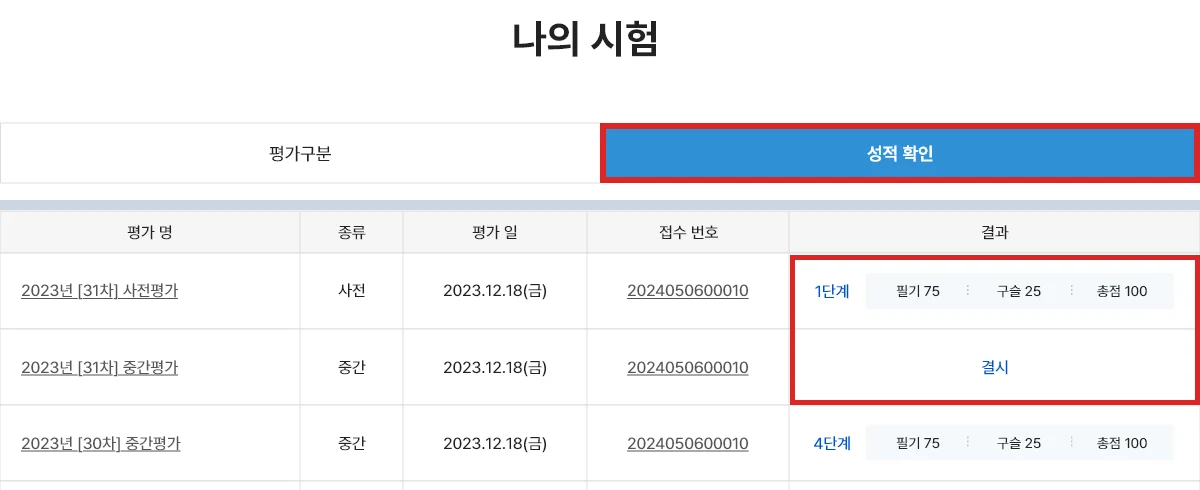
kiiptest.org screen (captured 2025-12, sample data). The screen may have changed.kiiptest.org 화면 (성적 확인 탭의 결과, 2025-12 캡처, 예시 데이터) · 화면이 바뀌었을 수 있어요 Source (출처): kiiptest.org 사전평가 안내 · kiiptest.org 사전·중간·종합평가 안내
Contacts (문의처)
- ☎ 1345Immigration Contact Center (외국인종합안내센터): 20 languages, weekdays 09:00–22:00; after 18:00 only Korean, English and Chinese.외국인종합안내센터: 20개 언어, 평일 09:00~22:00 (18:00 이후는 한국어·영어·중국어).
- ☎ 02-2643-8791 (ext. 1 (내선 1번))Korea Immigration Services Foundation (한국이민재단) customer centre, as listed on kiiptest.org: weekdays 09:00–18:00.한국이민재단 고객센터 (kiiptest.org 안내): 평일 09:00~18:00.
CBT test centres (the CBT is taken at a centre, not online) (CBT 센터)
- 서울 CBT 센터 (인사동): 02-733-8791
- 광명 CBT 센터: 02-897-8902
- 대전 CBT 센터: 042-223-8791
LearnKIIP can't see or change your account, registration or results. Only these offices can help with them.LearnKIIP는 계정, 접수, 결과를 보거나 고칠 수 없어요. 위 기관에 문의하세요.
Sources and last check (출처와 마지막 확인)
Last checked against the official sources: 2026-10-29 (마지막 확인 2026.10.29.)
Socinet pages need a login session, so we link Socinet's home page and give the menu path.사회통합정보망 페이지는 로그인 세션이 있어야 열려서, 첫 화면 주소와 메뉴 경로를 적었어요.
- 법무부 「2025년도 사회통합프로그램 운영지침」 · 2025-03-03 · 알림마당 → 관련규정
- 사회통합프로그램 참여자 교육수수료 알림 (법무부 고시 제2024-434호, 2025-01-01 시행) · 2026-08-13 · 알림마당 → 공지사항
- 교육수수료 결제 방법 안내 · 2025-04-08 · 알림마당 → 공지사항
- 사회통합정보망 연계과정 · 사회통합프로그램 → 연계과정
- 사회통합정보망 로그인 (아이디/비밀번호 찾기) · 회원로그인 → 아이디/비밀번호 찾기
- 법무부 사회통합프로그램 안내
- 법무부 외국인종합안내센터(1345)
- kiiptest.org 첫 화면 (한국이민재단 고객센터, CBT 센터 전화)
- kiiptest.org 접수 안내 (응시료, 환불 기준)
- kiiptest.org 응시 안내 (신분증, 입실, 결과)
- kiiptest.org 사전평가 안내
- kiiptest.org 중간평가 안내
- kiiptest.org 종합평가 안내 (영주용·귀화용)
- kiiptest.org 비밀번호 찾기
- kiiptest.org 공지 「2차 사전평가 접수안내」 · 2026-02-20
- kiiptest.org 공지 「26년 23기 CBT 사전평가 및 종합평가 접수 안내」 · 2026-10-19
- kiiptest.org 공지 「2026년 사회통합프로그램 기본소양평가 CBT센터 중간평가 운영 알림」 · 2026-01-06
- 하이코리아 「체류민원 자격별 안내 매뉴얼」 · 2026-11-02
- 법무부 「국적업무처리지침」 제17조 (법무부예규 제1378호) · 2026-01-02
- 「국적법 시행규칙」 제4조 (종합평가 및 면접심사) · 2026-10-02
- 법무부고시 제2025-408호 (거주(F-2) 자목 기준 고시) 붙임 2 · 2025-10-24
- 사회통합프로그램 참여자 교육 수수료 고시 (법무부고시 제2024-434호) · 2025-01-01